If you’re running Google Ads right now – whether for your roofing company, your dental clinic, your law firm, or your online store – something important has shifted.
Google didn’t just roll out minor tweaks this year. They made some of the biggest structural changes to how ads are bought, shown, and measured in years. Some of these changes will save you money. Some will seriously hurt you if you ignore them.
At We The Freelancer (WTF), our performance marketing experts manage Google Ads campaigns across 38 countries. This blog breaks down every major update in plain English – no jargon, no fluff – with what changed, what it means for your business, and what you should do next.
Why Google Ads in 2026 Feels Different
Let’s be honest. Google Ads used to feel like something you could control.
You picked your keywords. You set your bids. You wrote your ad copy. You watched the results.
That level of manual control is largely gone.
In 2026, Google’s AI is making most of those decisions for you – and the businesses winning right now are the ones who have learned how to feed the machine better, not fight against it. The ones struggling? They’re usually managing everything themselves or stuck with an agency that hasn’t kept up.
The good news: once you understand these changes, you can get more leads for less money. Let’s get into it.
1. AI Max for Search Is Now Live – And It’s Delivering Results
If you’ve been running Search campaigns, this is the biggest update you need to pay attention to.
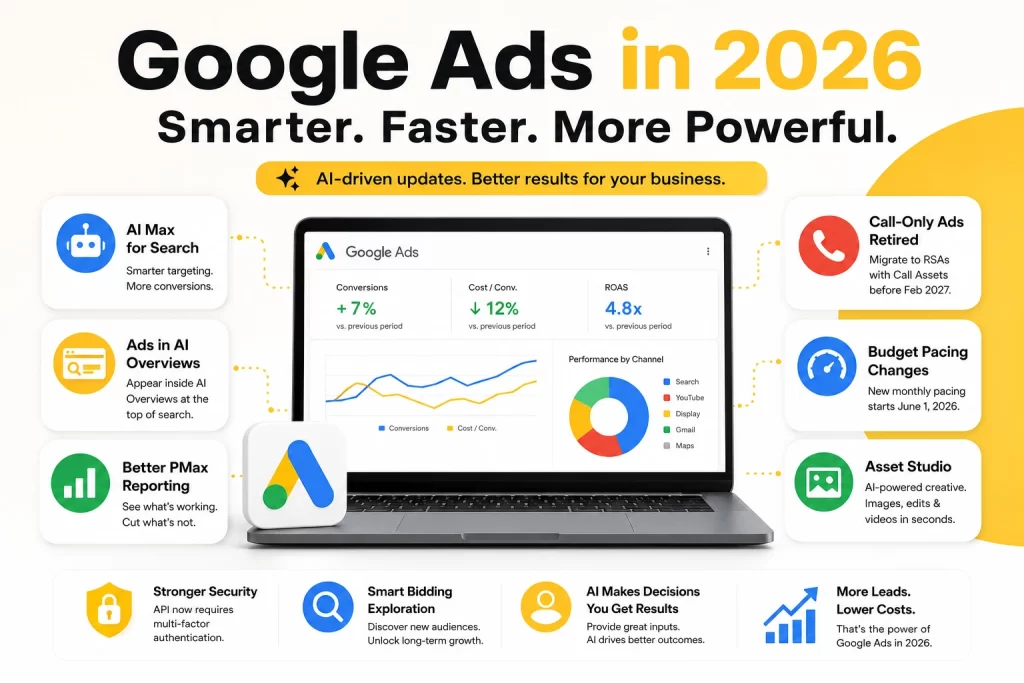
AI Max for Search just came out of beta – and Google’s own internal data shows it’s delivering 7% more conversions at a similar cost-per-acquisition (CPA). That’s not a small number.
So what is AI Max? Think of it as a smarter layer on top of your existing Search campaigns. It combines:
- Broader keyword matching that finds searchers you would’ve missed before
- Automatic ad text customisation based on the user’s actual search query
- Smart URL expansion that routes users to the most relevant page on your site
Real-world example: Let’s say you run a roofing company in Atlanta. You’re currently targeting “roof replacement Atlanta” and “metal roofing contractor near me.” With AI Max, your ads can also show for searches like “my roof is leaking what do I do” or “best roofing company Atlanta reviews” – searches with clear buying intent that you’d never have added manually.
The system interprets intent. You don’t have to guess every possible search phrase anymore.
What you should do: If you’re running Search campaigns, enable AI Max now. Don’t wait for September, when Google will automatically upgrade Dynamic Search Ads – get ahead of it, control the rollout, and give the AI more time to learn your account.
2. Your Ads Can Now Appear Inside Google’s AI Overviews
You’ve probably noticed those AI-generated answer boxes at the top of Google search results. They’re called AI Overviews, and they’ve been capturing attention that used to go to traditional search results.
Here’s the update: Google Ads can now appear inside those AI Overview boxes – not just above or below them.
This matters because AI Overviews sit at the very top of the page. If your ad appears within one, you’re getting premium placement in a spot most of your competitors haven’t even thought about yet.
Important caveat: This placement is currently available in select countries including the US, India, Australia, Canada, and a handful of others – and only for text and shopping ads from Search, Shopping, and Performance Max campaigns. It’s not yet a globally available placement, and sensitive verticals (healthcare, finance, adult) are excluded.
Real-world example: Someone searches “how much does it cost to replace a roof in Texas.” Google shows an AI Overview summarising roofing costs. Your roofing company’s ad can now appear right inside that answer – reaching a high-intent prospect at the exact moment they’re researching the service you offer.
What you should do: Make sure your Search and Performance Max campaigns are in good shape – ad relevance, quality scores, and strong landing pages are what Google uses to determine eligibility for this placement. You can’t bid specifically for it, but you can optimise for it.
3. Performance Max Finally Has Reporting Worth Using
If you’ve ever run a Performance Max (PMax) campaign and felt like you had no idea where your money was going – you’re not alone. For years, the number one complaint about PMax was exactly that.
Google heard it. In 2026, Performance Max now gives you:
- Channel-level reporting – see exactly how much is going to YouTube, Search, Display, Gmail, and Maps
- Asset-level segmentation – find out which headlines, images, and videos are driving conversions and which are dead weight
Real-world example: A dental clinic running PMax at $4,000/month couldn’t tell if their video assets were working. With the new reporting, they discovered 70% of their conversions came from Search placements – while Display ads were burning $1,200/month with near-zero results. They cut Display, redirected the budget to Search, and their cost-per-new-patient dropped 30%.
That’s the power of actually being able to see where your money goes.
What you should do: Log into your PMax campaigns today and check the channel-level report. You might be surprised – and you should act on what you find.
4. Call-Only Ads Are Being Retired – The Deadline Is Closer Than You Think
This one is critical for any business that relies on phone calls – contractors, plumbers, electricians, HVAC companies, lawyers, medical clinics.
Google stopped allowing new call-only ads to be created in February 2026. Existing ones will stop running completely in February 2027.
If your campaigns are built on call-only ads, you need to migrate now – not next quarter.
The replacement: Responsive Search Ads with Call Assets. These give you the same ability to drive phone calls but are more flexible, reach more placements, and work with Google’s Smart Bidding.
Real-world example: An HVAC company in Phoenix had been running call-only ads for three years – generating 60–80 calls a month at a low cost-per-call. After migrating to Responsive Search Ads with Call Assets, call volume dipped 15% initially, then rebounded and increased 22% above their previous baseline after two weeks of AI optimisation.
The new format performs better. The key is migrating early so Google’s AI has time to learn.
What you should do: Audit your campaigns right now. If you see any call-only ads still running, start building RSAs with Call Assets as replacements. Set up call conversion tracking (60–90 second minimum duration is standard). Don’t wait until January 2027 when everyone else panics.
5. Budget Pacing Changes on June 1, 2026 – This One Can Cost You
This update is subtle but has real financial implications – especially for businesses running ads on limited schedules.
Starting June 1, 2026, Google is changing how it paces your daily budget for campaigns that use ad scheduling.
Previously, if your ads only ran Monday to Friday (or only during business hours), Google paced your spend across those active days only.
Now, Google paces toward the full monthly limit (30.4 × your daily budget) regardless of how many days your schedule actually runs.
The real numbers matter here:
- A $100/day budget running Monday–Friday used to pace toward roughly $2,200/month
- After June 1, that same budget paces toward $3,040/month – a ~38% increase – concentrated into your 22 active days
Your ads still won’t run on disabled days. But Google will spend more aggressively on the days they do run to hit that monthly target. If you don’t adjust your daily budget downward, your monthly spend will go up significantly.
Note: Local Services Ads are not affected by this change.
What you should do: If you run campaigns on a limited schedule (weekdays only, business hours only, specific days), calculate your actual desired monthly spend and divide by 30.4. Set that as your new daily budget before June 1 to avoid overspending. Don’t assume this will sort itself out – it won’t.
6. Google’s Asset Studio Is Now Your AI Creative Team
Writing ad copy and creating images used to mean either doing it yourself or paying someone else. Google’s Asset Studio – now live inside Google Ads – changes that.
Powered by Google’s Imagen 4 and Veo AI models, it lets you:
- Generate product lifestyle images from simple text prompts
- Edit existing creative with natural language (“make this feel more seasonal”)
- Create short video ads (up to 10 seconds) from a handful of product photos
- Test creative variations without starting from scratch each time
Real-world example: A landscaping company in Chicago used Asset Studio to generate high-quality spring lifestyle images – freshly landscaped yards, seasonal flowers – in about 20 minutes, without a photographer. They tested six image variations and found one that outperformed their existing photography by 40% in click-through rate.
What you should do: Open Asset Studio from the Tools section inside Google Ads and experiment with your best-performing campaign’s creative. Start with one image variation and compare it against your control. The output quality is genuinely impressive for most use cases.
One honest caveat: Asset Studio is a simplified version of Google’s standalone AI tools. You have limited control over motion and pacing in videos, and human review is still essential – especially for brand consistency and ad policy compliance.
7. Google Ads API Now Requires Multi-Factor Authentication
This is a technical one, but important if you or your agency uses the Google Ads API or third-party automation tools.
Starting April 21, 2026, the Google Ads API requires multi-factor authentication (MFA) for anyone generating new OAuth 2.0 tokens. This affects platforms like Google Ads Editor, BigQuery Data Transfer Service, and third-party reporting tools.
Key nuances the blog you’ve read elsewhere might miss:
- Existing OAuth tokens keep working – the change only applies when generating new tokens
- Service account workflows are fully exempt – if your automation uses service accounts (the recommended approach for automated workflows), nothing changes
- Users without 2-step verification enabled on their Google Account will be prompted to set it up when they next authenticate
What you should do: Enable 2-step verification on your Google Account under Security Settings. If you work with an agency or use automation tools, ask them to confirm their workflows are compliant – and whether they use service accounts (if so, they’re likely fine).
8. Smart Bidding Exploration – The Growth Lever Most Businesses Ignore
Here’s a feature that most small business owners are sleeping on.
Smart Bidding Exploration lets Google temporarily lower your ROAS target to explore new audience segments and traffic opportunities outside your current reach.
Think of it this way: your campaigns have been fishing in the same pond for months. Smart Bidding Exploration lets Google fish in new ponds – even if immediate returns are slightly lower – to find customers you didn’t know existed.
Real-world example: A custom furniture maker in Dallas had been running ads for two years with a solid 4x ROAS. Growth had plateaued. They turned on Smart Bidding Exploration for 30 days. Google temporarily dipped their ROAS to 3.2x while exploring new patterns – then surfaced 47 new customer profiles that became a sustainable new audience segment, pushing their long-term ROAS to 4.8x.
Who should use this: Businesses with at least 50 conversions per month, healthy margins, and the ability to absorb a short-term dip in exchange for long-term growth. If your account is still in the learning phase or you’re running tight margins, wait.
The Bottom Line: What These Changes Mean for Your Business
Here’s the honest truth.
Google is moving toward a world where the advertiser’s job is to provide the AI with great inputs – and the AI handles the rest. Manual keyword-level micromanagement is becoming less effective by the month. The businesses winning right now are the ones who:
- Feed Google clean conversion data – set up conversion tracking properly, connect your CRM, and share lead quality signals
- Invest in creative quality – headlines, images, and video matter more than ever because the AI uses them as signals to find the right audience
- Migrate away from deprecated formats now – call-only ads need to go; the deadline is not theoretical
- Monitor the new reporting – AI Max and Performance Max are more powerful than ever, but only if you’re checking where the money actually goes
- Adjust budgets before June 1 – the pacing change will quietly increase your monthly spend if you don’t act
Whether you’re running ads for a roofing business, a dental office, a law firm, or an e-commerce store – these updates apply to you.
Running Google Ads Without the Right Expertise Is Getting Expensive
Every one of these updates requires more technical knowledge and faster response times than a year ago. The margin for error is shrinking.
That’s exactly why businesses across 38 countries work with We The Freelancer (WTF) for their Google Ads management services and paid advertising services. Instead of hiring a full-time in-house team or paying agency retainer markups, you get a pre-vetted Google Ads expert and a dedicated Relationship Manager overseeing your campaigns – deployed in 48 hours.
Our performance marketing services cover everything from initial strategy to ongoing optimisation, with transparent reporting and no hidden fees.
Book a Free Strategy Call to see how our managed performance marketing team can take these updates off your plate – and turn them into growth.